
Information
How Do You Test PoE Network Cables Before Connecting IP Cameras?
How Do You Test PoE Network Cables Before Connecting IP Cameras?
Quick Answer: Testing PoE network cables requires conducting a visual inspection, running a wire map sequence to check for crossed pins, and utilising a certifier to verify accurate wattage. Proper testing guarantees both power and data reach your cameras safely without damaging internal circuits.
The rising demand for high-resolution IP security cameras and smart building integrations relies heavily on Power over Ethernet (PoE) technology. Combining power and data into a single line simplifies infrastructure immensely. Terminating Cat5e or Cat6 cables on-site remains a highly delicate process. A single misplaced copper core will prevent a camera from powering up or cause frustrating intermittent video feeds. Strict testing protocols and utilising professional-grade data networking tools guarantee that both data and power flow safely to the end device.
- Why Is It Crucial to Test PoE Network Cables Before Connecting IP Cameras?
- What Are the Most Common Causes of PoE Network Cable Failures?
- How Do You Test PoE Network Cables for IP Cameras Step-by-Step?
- Which Data Networking Hand Tools Are Essential for the Job?
- Which Data Networking Tools Should You Choose for Your Next Installation?
- Key Takeaways
- Conclusion: Ready to Secure Your Next PoE Installation?
- Frequently Asked Questions (FAQs) About PoE Cable Testing
Why Is It Crucial to Test PoE Network Cables Before Connecting IP Cameras?
Preventing Expensive Hardware Damage
Incorrectly wired lines frequently send voltage down the wrong pins. Modern switches push up to 90 watts of power down the line. Frying the internal circuitry of expensive security hardware happens easily during a rushed IP camera setup. Confirming the correct PoE voltage distribution protects your investment from permanent electrical damage and burnt network interface cards.
Guaranteeing Stable Video Bandwidth
Modern security cameras need constant high-speed data transmission to work properly. A 4K stream pushed across the network is going to need a perfect physical connection. The cable is tested to ensure it can carry the data at Gigabit speeds with no packet loss and no video buffering at all. That data flow has to be consistent in order to maintain crystal clear and reliable security feeds at all times.
Eliminating Costly Rework and Callbacks
Finding a cable fault after the camera mounts high on an exterior wall requires costly labour to take down and re-terminate. Hiring a cherry picker or scaffolding just to fix a single bad connection destroys project profitability. Testing everything at ground level saves valuable time and protects the professional reputation of the contractor.
What Are the Most Common Causes of PoE Network Cable Failures?
Inconsistent Wiring Standards
Confusion often arises between T568A and T568B wiring schemes. Failing to match the colour-coding consistently across both ends of the installation stands as the leading cause of dead links. Mixing these two standards creates a crossover cable, which actively blocks power delivery. Installers must pick one standard and stick to it strictly throughout the entire building.
Poor Termination Practices
Untwisting the cable pairs too far back from the terminal negatively affects the performance of the cable. The physical twists inside the jacket cancel out electromagnetic interference. Excessive untwisting introduces crosstalk and corrupts data packets. Proper cable termination keeps twists intact as close to the contact point as physically possible.
Incorrect Blade Orientation During Punch Down
Having the punch down blade facing the wrong direction remains a very common mistake among apprentices. An upside-down blade accidentally cuts the live cable side instead of trimming the waste end. Such an error instantly kills the connection and requires stripping the wire all over again.
| Cable Fault | Primary Cause | Typical Symptom |
|---|---|---|
| Open Circuit | Wire not punched down fully into the IDC | Camera receives absolutely no power or data |
| Short Circuit | Copper cores touching each other inside the jack | Switch port shuts down automatically to prevent fire |
| Crossed Pairs | Mixing T568A and T568B standards on opposite ends | Data packets fail to transmit across the network |
| High Crosstalk | Untwisting wire pairs too far back from the pins | Video feed buffers, stutters, or drops out entirely |
How Do You Test PoE Network Cables for IP Cameras Step-by-Step?
Following a logical testing sequence prevents troubleshooting headaches later on. Executing these steps in order guarantees your network runs flawlessly.
- Step 1: Conduct a Thorough Visual Inspection
Advise installers to check the outer sheath and confirm it has not been stripped back further than necessary. Verify that the minimum bend radius was respected around tight corners. Installers must also check that plastic zip ties on data runs are not over-tightened, as crushing the jacket ruins the internal geometry. - Step 2: Perform a Wire Map Test
Operating a basic network tester helps you check for continuity, open circuits, short circuits, and crossed wires. Wire mapping guarantees all eight pins connect correctly from the patch panel directly to the RJ45 outlet. Checking the map takes only a few seconds but saves hours of fault-finding. - Step 3: Utilise a Network Certifier for PoE Verification
Using a network certifier confirms the physical link performs to the expected category, such as Cat5e or Cat6. The certifier actively checks the internal resistance to see if the cable can support the necessary wattage required by the specific security camera model.
Source - Carson Miller
Which Data Networking Hand Tools Are Essential for the Job?
The Role of IDC Punch Down Tools
An Insulation Displacement Contact (IDC) tool seats individual cable cores into patch panels and wall modules. The internal spring mechanism pushes the wire down and cuts through the insulation to make a secure copper connection. Relying on professional data networking tools prevents damaged terminals and guarantees a tight fit.
The Necessity of Precision RJ45 Crimpers
Making custom-length patch leads requires a high-quality RJ45 crimper. Precision crimpers guarantee the copper pins bite perfectly into the cable cores. Loose crimps lead directly to dropped video frames and power failures.
Completing the Toolkit
Supplementary items complete a basic data termination kit. Having the right gear speeds up the entire installation process and keeps the site organised.
- A sheath stripper sized specifically for data cables.
- Fine side cutters to snip internal plastic splines cleanly.
- Cable labels to provide easy identification inside crowded server racks.
Which Data Networking Tools Should You Choose for Your Next Installation?
To get reliable network performance you absolutely need the right hand tools. Good quality data networking tools will keep your pairs twisted, your connections tight and your test results well within spec. Here are the ones we'd recommend for your next security camera project:
1. C.K Punch Down Tool
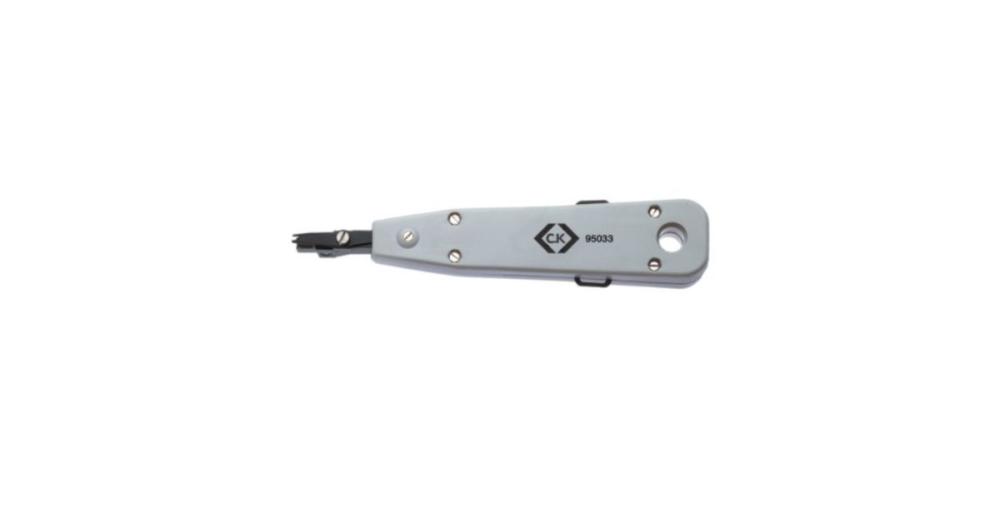
A dependable punch down tool acts as an essential component for seating individual cable cores into IDC terminals on patch panels, data outlets, and telephone modules. The C.K punch down tool pushes the conductor into the contact and cleanly trims the excess wire in the exact same action. Completing both steps simultaneously saves you valuable time on site. Every professional kit needs a highly rated C.K punch down tool to speed up large rack installations.
Key Features:
- Seats and trims waste wire simultaneously for rapid terminations.
- Creates precise insulation displacement contact without damaging the delicate copper core.
- Helps maintain pair twists close to the terminal for peak network performance.
2. C.K Cable Crimper for RJ11/RJ45
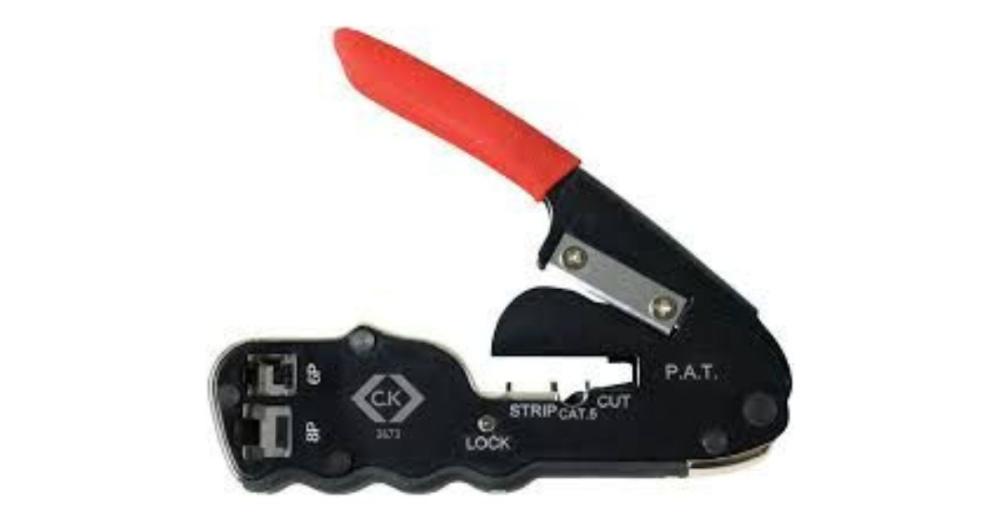
A reliable crimper operates as a vital asset for creating custom patch leads that connect devices directly to your main network switch. This heavy-duty C.K tool provides precise, secure crimps for standard data connectors. It guarantees maximum power and data transfer without the risk of loose, faulty wires holding up the job.
Key Features:
- Fully compatible with both RJ11 and standard RJ45 networking connectors.
- Engineered to handle a maximum 2.5 wire capacity safely.
- Features an ergonomic grip to reduce hand fatigue during repetitive daily terminations.
Key Takeaways
- Testing PoE network cables before connecting IP cameras helps prevent hardware damage, unstable video feeds, and costly installation repairs.
- A thorough visual inspection helps identify damaged cable jackets, excessive bends, and poor termination practices that can affect network performance.
- Using a network tester helps detect open circuits, short circuits, crossed wires, and incorrect pin connections before powering up IP cameras.
- Proper cable termination and consistent T568A or T568B wiring standards help maintain reliable data transmission and reduce connection failures.
- Professional data networking tools, including IDC punch down tools and RJ45 crimpers, help create secure connections and improve installation quality.
- Verifying PoE power delivery and cable performance before installation helps maintain stable camera operation, reduce troubleshooting time, and avoid expensive rework.
Explore Data Networking Tools at Meteor Electrical
Browse reliable data networking tools and accessories for professional PoE cable testing and IP camera installations.
Visit Meteor Electrical Browse data networking toolsConclusion: Ready to Secure Your Next PoE Installation?
Reliable security camera performance depends entirely on termination quality. Testing your cables and utilising proper punch down and crimping tools protects your hardware and guarantees uninterrupted video streams. Perfecting your IP camera setup requires patience, exact testing procedures, and reliable data networking tools.
Equipping your team with reliable hand tools requires a wholesale partner that understands the demands of the trade. Meteor Electrical ranks as one of the largest online electrical wholesalers serving the UK and Ireland. We proudly serve electrical contractors and facilities managers by supplying directly to work sites. Our rapid delivery network completely eliminates the need to wait at traditional trade counters.
Equip your van with the best data networking tools today for competitive trade pricing and rapid delivery!
Frequently Asked Questions (FAQs) About PoE Cable Testing
1) Why must I test a PoE network cable before plugging in an IP camera?
Testing verifies that the wire mapping is correct, preventing crossed power pins that could short-circuit and permanently damage internal camera components.
2) Which wiring standard should I use for IP cameras, T568A or T568B?
Either standard works perfectly for IP cameras, provided you choose one scheme and follow it consistently across the entire installation to match colour-coding on your panels and outlets.
3) What happens if I untwist too much wire during termination?
Untwisting the cable pairs too far back from the IDC terminal introduces electromagnetic crosstalk and signal interference, degrading video quality and data speeds.
4) Does over-tightening zip ties affect PoE cable performance?
Yes, over-tightening zip ties on data runs crushes the internal geometry of the cable, restricting bandwidth and causing power delivery to fail.
5) Why is a proper punch down tool better than a flathead screwdriver?
A dedicated punch down tool cleanly cuts through the insulation to make a secure contact and trims waste wire in one action, whereas a screwdriver damages the terminal and leaves loose connections.